
White Label SEO Dashboard vs Audit Tool: Which One You Need
Key Takeaways
- Dashboards track what happened (traffic, rankings, backlinks over time); audit tools diagnose what is broken right now — they solve different problems
- Dashboards support monthly retainer reporting; audit tools support new-client acquisition and project-based fixes
- Platforms that try to do both typically deliver shallow results in each — specialization produces deeper output
- Most agencies need both, but buying them in the wrong order wastes budget on the wrong client conversations
Does your client need to know their organic traffic went up 12% last month? Or do they need to know that 23 of their product pages have duplicate title tags, their largest contentful paint is 4.1 seconds, and their canonical tags are pointing to the wrong URLs?
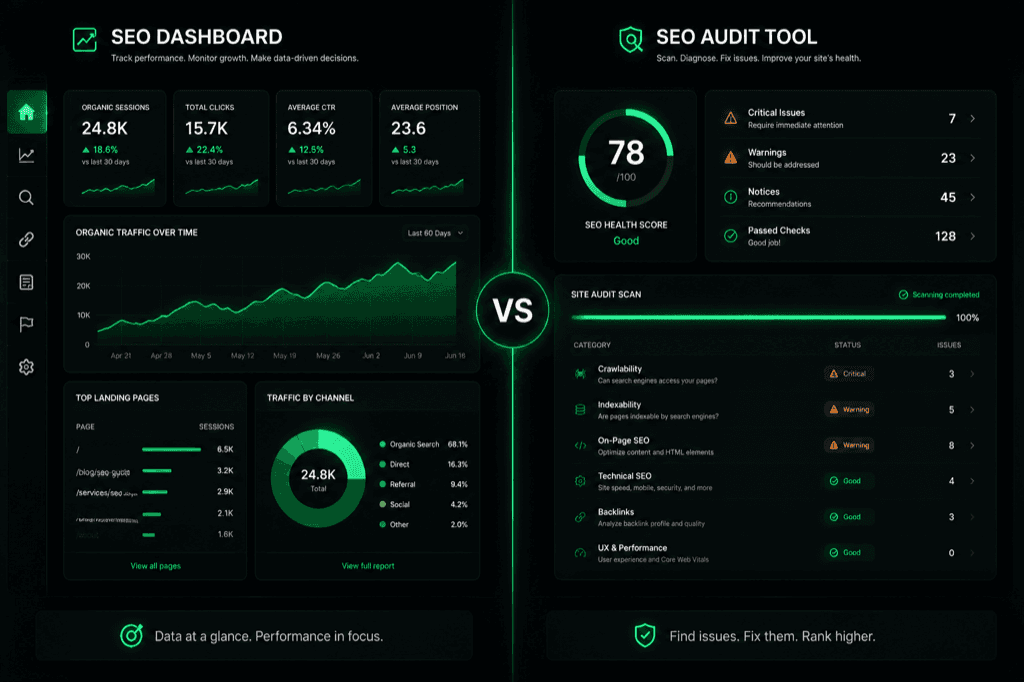
Those are two different questions, and they require two different tools. The first is a white label SEO dashboard — a metrics tracker that visualizes trends over time. The second is an audit tool — a diagnostic scanner that identifies specific problems and generates fixes. Agencies that treat these as interchangeable end up buying the wrong tool for the client conversation they are trying to have.
This article maps the functional differences, the client conversations each tool serves, and why platforms that try to do both tend to deliver shallow results on each side.
Dashboard: Rearview Mirror. Audit Tool: Diagnostic Scanner
The distinction is functional, not cosmetic. Dashboards and audit tools process different data, answer different questions, and serve different points in the client lifecycle.
| Dimension | White Label SEO Dashboard | White Label SEO Audit Tool |
|---|---|---|
| Core function | Track metrics over time | Find and diagnose problems |
| Data type | Rankings, traffic, backlinks, conversions | Crawl errors, speed issues, missing tags, schema gaps |
| Time orientation | Backward-looking (what happened) | Present-state (what is broken now) |
| Output | Charts, trends, KPI summaries | Prioritized issue list, severity scores, fix instructions |
| Update frequency | Daily/weekly automated refresh | On-demand per crawl |
| Client use case | "How is our SEO performing?" | "What specifically should we fix next?" |
Dashboard platforms like DashThis, AgencyAnalytics, and Whatagraph pull data from Google Analytics, Search Console, Ahrefs, and Semrush. They visualize it in branded reports with your logo, your colors, and your domain. The client gets a monthly PDF or a live dashboard link showing how their numbers moved. This is valuable for retainer clients who want to see progress over time.
Audit tools like SEOptimer, Sitechecker, and MendMySEO do something fundamentally different. They crawl the client's site, check analyzed pages against technical and on-page rules, and produce findings with evidence and implementation guidance. The output is not "your traffic went up" — it is a bounded snapshot of what was checked and what needs review. The illustrative demo shows sample categories, findings, and guidance; it is not a live customer audit.
See the audit-tool format: open the illustrative demo — the Overview shows sample findings, while GEO Insights demonstrates crawler-policy and readiness fields. It does not provide live cross-engine citation tracking.
The confusion arises because both tools produce branded white-label reports. They look similar in a sales demo. But the content of those reports serves entirely different client needs.
Different Client Conversations Need Different Tools
The tool you need depends on the conversation you are having with the client.
Retainer reporting (dashboard). A client on a $3K/month retainer wants to know: is the investment working? They need ranking trends, traffic growth, conversion data, and competitive position over time. A dashboard answers this with charts and KPI cards. It does not find or fix problems — it tracks whether the problems you already fixed are translating into results. This report goes out monthly and justifies the retainer renewal.
New-client acquisition (audit tool). A prospect considering your agency asks: what is wrong with my site? They need a specific diagnosis — not "your SEO needs work" but "you have 23 pages with missing meta descriptions, 12 broken internal links, and your page speed fails Core Web Vitals on mobile." An audit tool answers this with scored findings and fix instructions. This report goes out once, at the start of the engagement, and justifies the initial contract. As covered in our guide to selling SEO audits, the report itself becomes the pitch.
Project-based fix cycle (audit tool). A client says: we fixed the issues from the last audit — what is left? They need a re-scan that shows which problems are resolved, which persist, and whether new issues appeared. An audit tool handles this. A dashboard cannot — it tracks rankings and traffic, but it does not re-crawl the site to verify that a specific canonical tag was corrected or that a redirect chain was shortened.
The revenue model is different too. Dashboards support recurring revenue (monthly retainer reports). Audit tools support project revenue (per-audit fees) and can also drive retainers by identifying ongoing problems that need monitoring. The healthiest agency revenue mix uses both — but in the right order.
Why All-in-One Platforms Deliver Shallow Results on Both Sides
Several platforms market themselves as "dashboard + audit" — one tool that tracks metrics and finds problems. In practice, the combination creates trade-offs that weaken both functions.
Dashboard-first platforms that add an audit feature typically run a surface-level crawl: they check page titles, meta descriptions, and basic speed scores. They do not perform deep crawls that evaluate redirect chains, orphan pages, JavaScript rendering, schema validation, or AI search readiness across hundreds or thousands of URLs. The audit feature exists to check a box on the feature comparison page, not to compete with dedicated audit tools on depth.
Audit-first platforms that add a dashboard typically pull limited metric data. They might show keyword rankings and traffic summaries, but they lack the multi-source data integration (Google Analytics + Search Console + Ahrefs + social + PPC) that dedicated dashboard platforms provide. The dashboard feature shows basic trends but does not support the kind of detailed retainer reporting that clients on $3K+/month engagements expect.
The trade-off is predictable: building one tool well is hard enough. Building two tools in one platform means engineering resources are split, and neither function reaches the depth of a specialist tool. Agencies that rely on an all-in-one platform for both functions often find themselves supplementing it with a dedicated tool for whichever side is weaker — defeating the purpose of consolidation.
The practical approach: use a dedicated dashboard for retainer reporting (DashThis, AgencyAnalytics, Whatagraph) and a dedicated audit tool for diagnostics and client acquisition. The two tools serve different client conversations at different stages of the engagement. Trying to force one tool into both roles creates a mediocre version of each.
MendMySEO's white-label release page focuses on bounded priority-page evidence, Agency-controlled judgment, implementation guidance, and comparable re-scan proof. It does not claim a live KPI dashboard or AI citation tracking. Review the current release status.
Frequently Asked Questions
Do I need both a dashboard and an audit tool?
Most agencies do, but at different stages. Start with the audit tool — it drives new client acquisition and project revenue. Add a dashboard when you have retainer clients who need monthly performance reports. Buying a dashboard first means you have nothing to show prospects who ask "what is wrong with my site?"
Can a dashboard replace an SEO audit?
No. A dashboard shows traffic, rankings, and backlinks over time. It does not crawl the site to find broken links, missing canonical tags, slow pages, or schema errors. A client who asks "why did our traffic drop?" needs a diagnosis (audit), not just a chart showing the drop (dashboard).
What is a white label SEO dashboard?
A white label SEO dashboard is a metrics reporting platform branded with your agency's logo, colors, and domain. It pulls data from sources like Google Analytics, Search Console, and rank trackers, and presents it in a client-facing format. The client sees your brand, not the platform vendor's. Popular options include DashThis, Whatagraph, and AgencyAnalytics.
Which white label SEO reports drive more revenue?
Audit reports drive new revenue (client acquisition and project fees). Dashboard reports protect existing revenue (retainer renewals by showing progress). Audit reports have higher per-unit value ($500-2,500 per engagement) while dashboard reports have higher lifetime value (monthly retainer justification). Both matter — they serve different stages of the client relationship.
How do I choose between all-in-one and specialized tools?
Test the audit depth on your own site. Run the all-in-one platform's audit and a dedicated audit tool side by side. Count the number of issues found, the specificity of fix instructions, and whether the tool checks advanced factors like JavaScript rendering, redirect chains, and AI search readiness. If the all-in-one finds 15 issues where the specialist finds 80, the depth gap tells you whether the convenience is worth the trade-off.
Ready to see what your audit looks like?
Explore an illustrative static report; the demo does not crawl the URL you enter.