
What Is a Canonical Tag? How It Works and Why Every Page Needs One
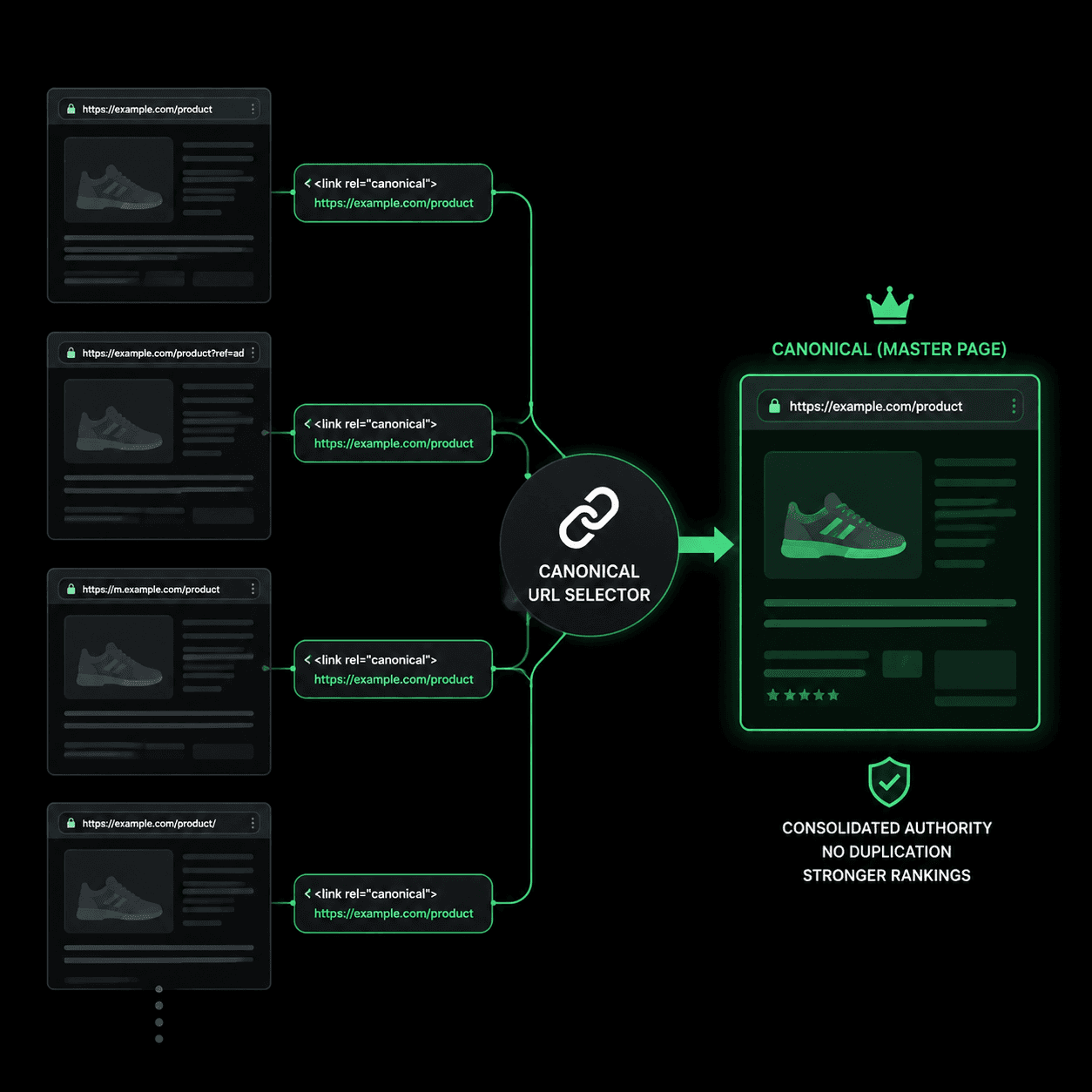
Key Takeaways
- A canonical tag (
rel="canonical") tells search engines which URL is the master version of a page when multiple URLs serve the same content - Every indexable page should have a self-referencing canonical — without one, Google picks its own preferred URL, and it often picks wrong
- Canonical tags and 301 redirects solve different problems: canonical keeps both URLs accessible, 301 permanently removes one
- URL parameters, HTTP/HTTPS variants, www/non-www, and trailing slashes create duplicate URLs that split link equity unless a canonical consolidates them
An ecommerce team notices their top product page dropped from position 3 to position 14. Nothing changed — same content, same backlinks, same title tag. But when they check Google Search Console's URL Inspection tool, they find Google is indexing ?sort=price, ?color=blue, and ?ref=newsletter as separate pages. Fifteen URLs. One product. Link equity split across all of them.
One line of HTML would have prevented it. A canonical tag is an HTML element — <link rel="canonical" href="..."> — that tells search engines which URL is the "official" version of a page. When Google encounters duplicate or near-duplicate content at multiple URLs, the canonical tag says: this is the one to index, this is the one that gets the ranking signals. Google Search Central treats it as a strong signal (not a directive — Google can override it) for determining which URL appears in search results.
Duplicate Content Is Structural, Not Intentional
Most site owners think of duplicate content as plagiarism — someone copying your text. In practice, the more common source is your own URL structure generating multiple addresses for identical content. Every variant Google discovers gets crawled, indexed, and evaluated independently unless you tell Google they are the same page.
Common sources of unintentional duplicates:
| Variant type | Example | What happens without canonical |
|---|---|---|
| URL parameters | /product?sort=price | Google indexes each parameter combination as a separate page |
| Protocol | http:// vs https:// | Both versions compete for the same query |
| www / non-www | www.site.com vs site.com | Link equity splits between two domains |
| Trailing slash | /about vs /about/ | Google treats these as different URLs by default |
| Case sensitivity | /About vs /about | Some servers return the same content for both |
| Session IDs | /page?sid=abc123 | Each visitor generates a "unique" URL with identical content |
A 2020 Semrush study of 150,000 websites found that duplicate content issues appeared on 50% of sites audited. The majority were not plagiarism — they were structural URL variants that the site generated on its own. A canonical tag on each page consolidates these variants into a single authoritative URL, telling Google which version should hold all the ranking signals.
Why Every Page Needs a Self-Referencing Canonical
A self-referencing canonical is a canonical tag that points to the page's own URL. At first glance this seems redundant — why would a page need to declare itself as the canonical version of itself?
Because without it, Google decides for you. Google's canonicalization algorithm evaluates signals like internal links, sitemaps, redirects, and link equity to select a canonical URL. When those signals conflict — which they regularly do on sites with inconsistent internal linking — Google may pick a URL you did not intend. Google's John Mueller has confirmed in multiple Search Central sessions that self-referencing canonicals are a best practice because they remove ambiguity from the process.
Consider what happens without a self-referencing canonical: a page exists at https://example.com/shoes. Google discovers it through an internal link using https://example.com/shoes?ref=nav. Another link points to https://example.com/shoes/ with a trailing slash. Google now has three URLs with the same content and no canonical signal to resolve the conflict. It picks one — and it might pick the one with ?ref=nav, which means your clean URL loses its position in the index.
The fix is one line in your <head>:
<link rel="canonical" href="https://example.com/shoes" />This line goes on every indexable page, pointing to that page's clean URL. It eliminates guesswork and ensures that all link equity flowing to any variant of that URL gets consolidated to the version you control.
Missing Self-Referencing Canonical
Page has no canonical tag. Google may select a URL variant with parameters or a trailing slash as the canonical, splitting link equity across multiple indexed URLs.
Paste-ready fix
<link rel="canonical"
href="https://example.com/shoes" />
Canonical audit checks every indexable page for missing or misconfigured tags. See a full report →
Canonical Tags vs 301 Redirects: Different Tools, Different Jobs
Both canonical tags and 301 redirects tell Google to consolidate signals to one URL. The difference is what happens to the user. A 301 redirect physically sends the visitor to a different URL — the original URL stops loading its own content. A canonical tag keeps both URLs accessible to visitors while telling search engines to treat one as the authority.
| Scenario | Use canonical tag | Use 301 redirect |
|---|---|---|
Same content at ?sort=price variant | Yes — users need the sorted view | No — you would break the sorting feature |
| Migrated from old URL to new URL | No — old URL should stop existing | Yes — permanently move all signals |
http:// to https:// | No — HTTP should never serve content | Yes — force all traffic to HTTPS |
Print-friendly page (/page/print) | Yes — print version needs to remain accessible | No — redirect would break the print function |
| Regional duplicate (same language, different country TLD) | Depends — consider hreflang instead | No — each region needs its own accessible page |
The most common mistake is using a canonical tag where a 301 redirect is needed. After an HTTP-to-HTTPS migration, some sites add a canonical tag on the HTTP version pointing to HTTPS instead of implementing a 301 redirect. This leaves the HTTP version accessible and indexable — Google treats canonical as a hint, not a command, and may continue indexing the HTTP page. A 301 is a server-level instruction that Google follows immediately and permanently. For protocol migrations, domain changes, and permanent URL restructuring, always use 301 redirects. Save canonical tags for situations where both URLs need to remain functional for users.
Another critical rule: never point a canonical tag at a URL that returns a 301 redirect. If page A's canonical points to page B, and page B 301-redirects to page C, Google receives conflicting signals and may ignore the canonical entirely. Google's documentation on consolidating duplicate URLs recommends that canonical targets always return a 200 status code.
The illustrative MendMySEO demo may show canonical findings, but it is not an every-page or production-availability claim. Review the current release status.
Frequently Asked Questions
Is a canonical tag a directive or a hint?
Google treats it as a strong hint, not a directive. Google considers canonical tags alongside other signals — internal links, sitemaps, HTTPS preference — when selecting a canonical URL. In most cases Google follows the tag, but it may override it when other signals strongly contradict it. This is why consistency matters: your canonical tag, internal links, and sitemap should all point to the same URL.
Can I use a canonical tag to point to a page on a different domain?
Yes. Cross-domain canonicals are supported. If you syndicate content to a partner site, the partner can add a canonical tag pointing back to your original URL. Google will attribute ranking signals to your domain. Note that this only works if the content is identical or very similar — Google ignores cross-domain canonicals when the pages differ significantly.
What happens if two pages canonical to each other?
Google detects the loop and falls back to its own algorithm to select a canonical. The tags effectively cancel each other out. This usually happens accidentally during CMS migrations where canonical tags are templated incorrectly. Audit tools flag this as a "canonical loop" error.
Should paginated pages use canonical tags?
Each page in a paginated series (page 1, page 2, page 3) should have a self-referencing canonical pointing to itself. Do not point all pages to page 1 — that tells Google pages 2+ are duplicates and should not be indexed. Google deprecated rel="prev"/rel="next" in 2019, so self-referencing canonicals on each page are the current best practice.
How do canonical tags interact with hreflang?
Canonical and hreflang serve different purposes but must stay consistent. Each language version should have a self-referencing canonical pointing to its own URL, while hreflang tags point to the equivalent page in other languages. Pointing a French page's canonical to the English page tells Google the French version is a duplicate — which overrides the hreflang and removes the French page from French search results. For a detailed breakdown, see our guide on hreflang vs canonical.