
JSON-LD @id: Examples and @id vs url vs sameAs
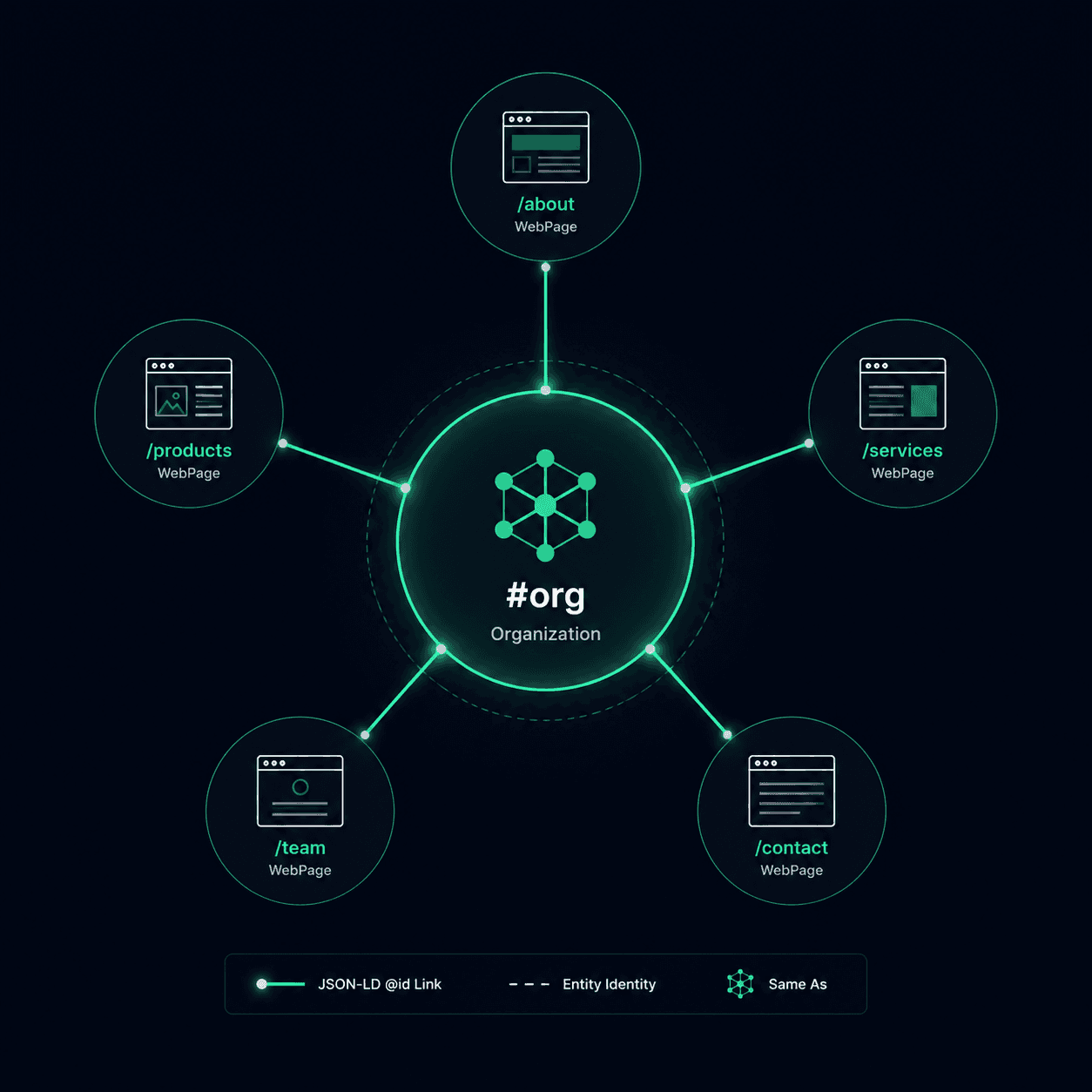
@id identifies a node in a JSON-LD graph. url gives a URL associated with that entity. sameAs points to a page identifying the same entity elsewhere. They can appear together because they describe different parts of the data model.
@id vs url vs sameAs
| Field | Purpose | Organization example |
|---|---|---|
@id | Identify and reference a graph node | https://example.com/#org |
url | Provide the entity's associated website URL | https://example.com/ |
sameAs | Identify the same entity through a reference page | An official company profile, rather than an employee or product |
#org is a naming convention, not required syntax. A full URL such as https://example.com/entities/organization also works. Keep the identifier stable and use different identifiers for different entities.
A Complete JSON-LD @graph Example
This fictional example defines the publisher, website and author, then references them from the article. All referenced nodes are included in this one document. Replace the example details before publishing.
<script type="application/ld+json">
{
  "@context": "https://schema.org",
  "@graph": [
    {
      "@type": "Organization",
      "@id": "https://example.com/#org",
      "name": "Sunrise Bakery",
      "url": "https://example.com/",
      "sameAs": ["https://www.linkedin.com/company/sunrise-bakery"]
    },
    {
      "@type": "WebSite",
      "@id": "https://example.com/#website",
      "url": "https://example.com/",
      "name": "Sunrise Bakery",
      "publisher": {"@id": "https://example.com/#org"}
    },
    {
      "@type": "Person",
      "@id": "https://example.com/about/#alex",
      "name": "Alex Rivera",
      "url": "https://example.com/about/"
    },
    {
      "@type": "Article",
      "@id": "https://example.com/blog/sourdough/#article",
      "url": "https://example.com/blog/sourdough/",
      "headline": "How we bake sourdough",
      "author": {"@id": "https://example.com/about/#alex"},
      "publisher": {"@id": "https://example.com/#org"},
      "isPartOf": {"@id": "https://example.com/#website"}
    }
  ]
}
</script>
The Article's publisher points to the Organization; its author points to the Person. These references express relationships in your graph. A search feature may require additional fields beyond this modeling example. For selecting identity URLs, see Organization and Person sameAs examples.
Key Takeaways
@idassigns a stable URI to a JSON-LD entity — other blocks reference that URI instead of duplicating the entity's properties- Without
@id, repeated blocks have no shared identifier in the graph you publish; this does not prove how Google stores them internally - Hash fragments such as
#orgare optional naming conventions; other valid IRI references can identify a node - Common mistakes include using different
@idvalues for the same intended node or reusing one identifier for different nodes
An e-commerce site may repeat an Organization description across hundreds of product pages. Without an identifier, those are repeated anonymous nodes in the JSON-LD data the site publishes. A stable @id lets product nodes reference one named Organization node instead of duplicating all of its properties.
@id in JSON-LD assigns an IRI — an identifier like https://example.com/#org — to a node. Other nodes can point to that identifier instead of re-declaring all properties. This makes the site's own graph explicit; it does not guarantee that a search engine will consolidate records, show a Knowledge Panel, or change rankings.
The W3C JSON-LD 1.1 specification defines @id as the keyword used to identify a node with an IRI. In practical terms, it is an identifier in the JSON-LD graph you publish—not evidence about Google's internal Knowledge Graph.
Without @id, Your Published Graph Has Anonymous Nodes
When a JSON-LD block has no @id, it describes a node without a stable identifier. Consumers may still process its properties, but other nodes cannot reference that anonymous node by a shared IRI.
Repeated anonymous blocks can also drift: one template may say "Sunrise Bakery LLC" while another omits the address. A stable identifier does not fix contradictory facts, but it gives maintainers a clear reference point and makes inconsistent definitions easier to detect.
The modeling benefit grows with site complexity. A multi-location business can give each LocalBusiness node its own identifier and point parentOrganization to the parent Organization's identifier. That expresses the intended hierarchy in the published graph.
| Scenario | Without @id | With @id |
|---|---|---|
| Organization on 50 pages | Repeated anonymous descriptions | References can share one @id IRI |
| Product references its manufacturer | Product block repeats all Organization properties inline | Product's manufacturer field points to {"@id": "https://example.com/#org"} |
| WebPage belongs to a WebSite | Website properties may be repeated inline | isPartOf can reference the WebSite node |
| Multi-location business | No explicit parent reference in the published graph | parentOrganization references the Organization's @id |
| Person on About + blog posts | Repeated anonymous Person descriptions | Author fields can reference one Person @id |
Google's Organization structured data documentation does not list @id as a required property. Use it when stable node references improve your data model; do not present it as a hidden eligibility or ranking requirement.
Cross-Page References: How @id Connects Your Schema Graph
The real power of @id is not labeling entities — it is enabling references between them. Once an entity has an @id, any other JSON-LD block on any page of your site can point to it without redeclaring its properties. This turns isolated blocks into a connected graph.
The pattern is: define once, reference everywhere. Your homepage defines the Organization with all its properties and an @id. Every other page that needs to mention the Organization — product pages, blog posts, contact pages — includes only the @id reference:
<!-- Homepage: full definition -->
<script type="application/ld+json">
{
  "@context": "https://schema.org",
  "@type": "Organization",
  "@id": "https://example.com/#org",
  "name": "Sunrise Bakery",
  "url": "https://example.com",
  "logo": "https://example.com/logo.png",
  "sameAs": [
    "https://www.linkedin.com/company/sunrise-bakery",
    "https://www.facebook.com/sunrisebakery"
  ]
}
</script>

<!-- Product page: reference only -->
<script type="application/ld+json">
{
  "@context": "https://schema.org",
  "@type": "Product",
  "name": "Sourdough Loaf",
  "manufacturer": { "@id": "https://example.com/#org" }
}
</script>
The product page's manufacturer field contains a single reference: {"@id": "https://example.com/#org"}. In JSON-LD terms, the Product node now points to the Organization node with that identifier. Whether a particular search engine combines definitions across crawled pages is an implementation detail, not something the markup alone proves.
The JSON-LD specification defines node references as links between nodes without duplicating every property. A blog post's author can reference a Person node, and a Product can reference an Organization node. A sameAs value points to another page about the same node. These are graph relationships, not guarantees about Search presentation.
Repeated Organization blocks have no shared @id
In this illustrative sample, Organization markup is repeated on 14 pages without a shared identifier. Consider one stable @id when other nodes need to reference the same Organization.
Paste-ready fix
"@id": "https://yourdomain.com/#org"
Illustrative static finding; it does not establish full-site coverage or a Search outcome. See the sample →
IRI Conventions and Common @id Mistakes
The W3C specification permits IRI references and blank-node identifiers. For reusable site entities, an absolute HTTPS identifier under a domain you control is a practical maintenance choice. Hash fragments separate an entity identifier from its associated document URL; they are not mandatory.
- Different nodes, different identifiers: keep the Organization, WebSite, Person and Article distinct, even if they share a page URL.
- Same intended node, stable identifier: avoid accidentally switching between
#organd#organizationacross templates. - References need meaningful definitions: a reference on its own supplies no name or other properties. The complete graph above makes the relationship inspectable within one document.
- Keep facts consistent: identical identifiers do not repair contradictory names, addresses or entity types.
- Validate the intended Search feature separately: valid JSON-LD is not a promise of a rich result or an automatic cross-page merge by a search engine.
Google Search Central's structured data examples sometimes use @id, but the property is not a universal required field. Follow the requirements for the specific Search feature and use graph identifiers where they accurately model relationships.
The illustrative MendMySEO demo may show JSON-LD evidence, but it is not an every-block or production-availability claim. Review the current release status.
Frequently Asked Questions
Does @id directly improve rankings?
No documented rule makes @id a ranking signal or Knowledge Panel trigger. Its observable benefit is structural: it gives nodes stable identifiers and makes references in your own JSON-LD graph explicit.
Can I use any URI as an @id value?
Technically, any valid IRI works. Practically, use your own domain with a hash fragment (https://yourdomain.com/#org). Using third-party URLs (like a LinkedIn profile URL) as @id creates confusion — the @id identifies your local entity definition, while sameAs links it to external representations. Keep @id on your domain, use sameAs for external platforms.
Do I need @id on every JSON-LD block?
Not every block benefits equally. Prioritize @id for entities that appear across multiple pages: Organization, WebSite, Person (if used as author). One-off entities like a single Product on its own page or an FAQ block benefit less because there is no cross-page reference to resolve. Add @id to those too for completeness, but the high-value targets are the shared entities.
What happens if two different entities share the same @id?
In JSON-LD, the same @id identifies the same node. Reusing it for two intended nodes can combine incompatible types or properties in the graph you publish. Give distinct nodes distinct identifiers.
Is @id the same as the url property?
No. The url property provides a URL associated with the item, while @id identifies a node in the JSON-LD graph. A Person's url might be /about, while /about/#founder identifies the Person node in the publisher's graph.